
Every business that depends on computers whether it is a video editing studio, a small gaming café, a design agency, or a content creation team eventually runs into the same frustrating problem. You invest in a powerful new graphics card or a brand-new processor, expecting a noticeable jump in performance, only to find that the upgrade barely makes a difference. The reason is almost always the same: a hardware bottleneck.
A bottleneck happens when one component in your computer cannot keep up with another, limiting the overall performance of the system. The good news is that you no longer have to guess which part is holding your machine back. A free online tool, the Bottleneck Calculator, lets you check exactly how balanced your CPU and GPU pairing is before you spend another rupee, dollar, or peso on an upgrade.
What Exactly Is a Bottleneck, and Why Should Business Owners Care?
Think of your computer like a small production line. The CPU prepares the work, and the GPU executes it. If the CPU is slow, the GPU sits idle waiting for instructions, wasting its full potential. If the GPU is weak, it cannot keep up with what the CPU is sending it, so frames or render jobs queue up and performance drops.
For everyday users this might just mean lower frame rates in a game. But for a business, the stakes are higher. A content creation studio that edits video all day, a 3D rendering team, an architecture firm running visualization software, or even a customer-facing kiosk running interactive graphics all of these depend on a balanced system. An unnoticed bottleneck quietly eats away at productivity every single day, turning into lost hours and lost revenue over a month or a year.
This is exactly the kind of inefficiency that smart business owners try to eliminate, and it is surprisingly easy to fix once you know where to look.
How the Bottleneck Calculator Works
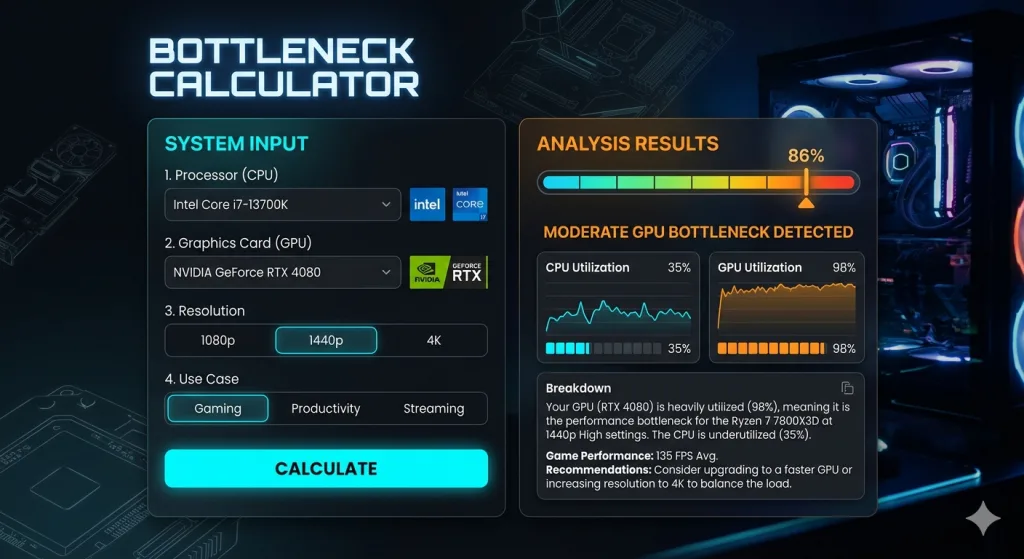
The Bottleneck Calculator is built to remove the guesswork from hardware decisions. Instead of relying on forum opinions or trial and error, it uses real benchmark data to compare your CPU and GPU and generates a clear bottleneck percentage.
Here is how the process works in practice:
- Select your CPU model from the database, which covers a wide range of Intel Core and AMD Ryzen processors.
- Select your GPU model, choosing the exact card and variant you own.
- Choose your use case — gaming, content creation, or general productivity — since different workloads stress different parts of the system.
- Set your target resolution, because the same hardware pair behaves differently at 1080p compared to 4K.
- Review your results, which show a bottleneck percentage along with a clear explanation of which component is limiting the other.
A result under ten percent means your system is well balanced and there is nothing to worry about. Between ten and twenty percent is a mild imbalance that may show up only in demanding tasks. Anything above twenty percent is worth addressing, and crossing thirty percent means a significant amount of performance and money is being wasted.
Why This Matters Before You Spend on an Upgrade
One of the most common and costly mistakes businesses make is upgrading the wrong component first. A company might purchase an expensive new graphics card for its design team, expecting faster rendering, only to discover that an outdated processor is the real limiting factor. The new GPU sits underutilized, and the investment does not deliver the expected return.
Running your current setup, and your planned upgrade, through the calculator before making a purchase prevents exactly this kind of mistake. If pairing an existing CPU with a new GPU still shows a heavy CPU bottleneck, that tells you the processor needs attention too, or at least that expectations for the GPU upgrade should be adjusted. This kind of planning is the difference between a smart capital expenditure and an expensive lesson learned the hard way.
Beyond the GPU and CPU: Planning a Full Build
If you are setting up new workstations for a growing team, hardware balance is only part of the picture. You also need to make sure your power supply can reliably support the components you choose, especially if multiple high-performance machines will be running simultaneously in an office or studio. Underestimating power requirements can lead to instability, unexpected shutdowns, or even hardware damage over time.
This is where a dedicated PSU Calculator becomes useful alongside the bottleneck check. It calculates the recommended power supply wattage based on your selected components, so you are not left guessing whether a 550W or 750W unit is the right choice for your build. Using both tools together gives you a complete, low-risk picture before you commit to a purchase order: one tool tells you whether your components are well matched, and the other tells you whether your power supply can support them safely.
Practical Scenarios Every Business Should Recognize
Consider a small video production company upgrading its editing rigs. The team buys a powerful new GPU, but the existing CPUs are several generations old. The calculator reveals a severe CPU bottleneck, meaning the new card cannot perform anywhere near its full potential until the processors are also replaced. Catching this in advance saves the company from a disappointing rollout and a second emergency purchase a few months later.
Or consider a design studio that already runs a strong CPU but an entry-level GPU for 3D visualization work. The calculator flags a GPU bottleneck, confirming that the next budget should go toward the graphics card rather than the processor. This kind of clarity turns hardware spending from a guessing game into a data-backed decision.
Final Thoughts
Technology decisions are business decisions. Every rupee spent on hardware that does not deliver its full performance is a rupee that could have been spent more wisely elsewhere. Tools like the Bottleneck Calculator and the PSU Calculator give business owners, IT managers, and creative teams a fast, free, and reliable way to make smarter hardware choices before money changes hands.
Whether you are setting up your first workstation, scaling a creative team, or simply trying to understand why a recent upgrade did not deliver the results you expected, running your hardware specs through a proper bottleneck check is one of the simplest ways to protect your investment and keep your operations running at full speed.