
Working in another country changes the small details of a normal phone routine. Documents may arrive through local email services, workplace chat apps, school portals, travel sites, or government platforms. A reliable office app helps turn those scattered files into something you can actually read, edit, and return on time.
Begin with the official installation route
Open HUAWEI AppGallery and search for WPS Office by name. Review the listing, confirm that it is the official application, and select Install. The Huawei Community page for huawei wps presents this direct process and is a useful reference when setting up a new Huawei phone overseas.
App availability can vary by region, so check the country or region connected to the HUAWEI ID when search results look incomplete. It is usually better to correct the store region or update AppGallery than to download an unknown APK from a third-party site.
Build a practical document workflow
After installation, decide where new files should enter your workflow. You may receive a Word document by email, a spreadsheet from a team chat, a presentation through a browser, or a PDF from a local service provider. Download the file, open it from the Files app, and select WPS Office when Huawei displays the available applications.
For frequent travel, the most useful huawei wps habit is keeping critical documents available offline. Store copies of tickets, booking confirmations, identification forms, meeting notes, and current project files on the device. Use folders with clear names instead of leaving everything in Downloads.
Check editing, sharing, and formatting
Before sending a document back, review page breaks, fonts, tables, formulas, and image placement. Mobile editing is convenient, but a file created with specialist desktop software may not display perfectly on every screen. Exporting a final version as PDF can help preserve the layout when the recipient only needs to read or approve it.
When sharing, use the destination requested by the organisation rather than moving confidential files through several personal apps. Review WPS cloud settings, link permissions, and account access, especially on a phone used for both personal and client work.
Keep the app dependable
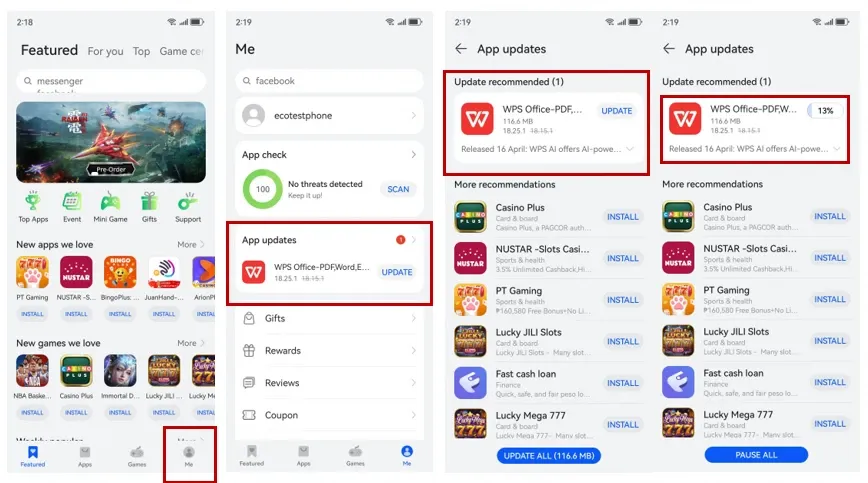
Update WPS Office through AppGallery, leave enough free storage for temporary files, and restart the phone if an update does not complete properly. If notifications or uploads stall, test another network and confirm that battery management is not closing the app during a long transfer.
With a clear installation source and an organised file routine, Huawei users can manage local documents without carrying a laptop for every small task. Thehuawei wps walkthrough provides the starting steps; the rest comes down to secure storage, careful formatting, and a workflow that fits the country you are in.